How to read an Excel file using C#
The following program demonstrates the process of opening an existing Excel spreadsheet in C# by using the COM interop capability within the .NET Framework. Additionally, the program showcases how to identify and retrieve Named Ranges within Excel, as well as how to determine the range of occupied cells (Used area) within an Excel sheet.
By utilizing the .NET Framework's COM interop capability, developers gain the ability to seamlessly integrate C# with Excel, enabling efficient interaction with Excel spreadsheets. Through this integration, the program opens an existing Excel spreadsheet, providing access to its data and functionalities.
Excel Library
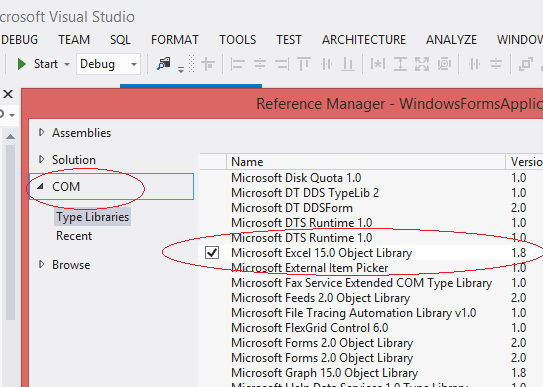
To access the object model from Visual C# .NET, you have to add the Microsoft Excel 15.0 Object Library to you project.
Create a new project in your Visual Studio and add a Command Button to your C# Form.
How to use COM Interop to Create an Excel Spreadsheet
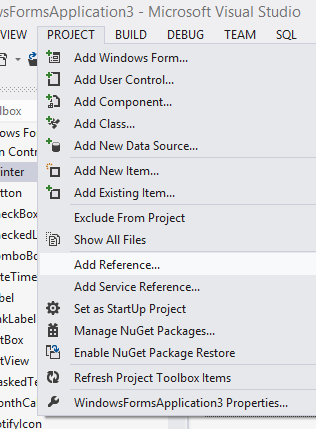
Form the following pictures you can find how to add Excel reference library in your project.
Select Add Reference dialogue from Project menu of your Visual Studio.
Select Microsoft Excel 15.0 Object Library of COM leftside menu and click OK button.
After import the reference library, we have to initialize the Excel application Object.
Next step is to open the Excel file and get the specified worksheet.
After get the selcted worksheet, next step is to specify the used range in worksheet
How to specify a range in Excel sheet?
If you want to select a specific cell in Excel sheet, you can code like this.
Reading Named Ranges in Excel
Worksheet.get_Range MethodIf you want to select multiple cell value from Excel sheet, you can code like this.
How to get the range of occupied cells in excel sheet

For reading entire content of an Excel file in C#, we have to know how many cells used in the Excel file. In order to find the used range we use "UsedRange" property of xlWorkSheet . A used range includes any cell that has ever been used. It will return the last cell of used area.
How to properly clean up Excel interop objects
Interop marshaling governs how data is passed in method arguments and return values between managed and unmanaged memory during calls. Most data types have common representations in both managed and unmanaged memory. The interop marshaler handles these types for you. Other types can be ambiguous or not represented at all in managed memory.
It is important to note that every reference to an Excel COM object had to be set to null when you have finished with it, including Cells, Sheets, everything.
The Marshal class is in the System.Runtime.InteropServices namespace, so you should import the following namespace.
Open and Read an Excel Spreadsheet Programmatically
Copy and paste the following source code in your C# project file
Full Source C#When you execute this C# source code the program read all used cells from Excel file.
Conclusion
By examining this program, developers can gain valuable insights into the process of opening an existing Excel spreadsheet in C# and perform operations such as locating Named Ranges and obtaining the Used area within the sheet. These capabilities enhance the integration between C# and Excel, enabling developers to use Excel's powerful features within their C# applications.
- How to create Excel file in C#
- How to open an Excel file in C#
- How to programmatically Add New Worksheets
- How to delete worksheet from an excel file
- How to format an Excel file using C#
- How to insert a picture in excel from C# App
- How to insert a background picture in excel
- How to create Excel Chart from C#
- How to export excel chart from C#
- How to excel chart in C# picturebox
- C# data validation input box in excel file
- Read and Import Excel File into DataSet or DataTable
- How to insert data to Excel file using OLEDB
- How to update data in Excel file using OLEDB
- How to export databse to excel file
- How to export DataGridView to excel file